
If you’ve ever landed on a hosting provider’s pricing page and felt like you needed a computer science degree to understand what you’re actually buying, you’re not alone. Terms like “TTFB,” “NVMe storage,” “SSL certificate,” and “CDN” get thrown around constantly, yet most hosting guides skip straight to price comparisons without explaining what these features actually do for your website. That’s a problem, because choosing the wrong plan based on misunderstood terminology can cost you customers, search rankings, and real revenue. This guide breaks down every critical hosting term with plain-language definitions, real-world examples, and direct connections to site speed, security, and reliability.
Table of Contents
- Why hosting terminology matters for your website
- Essential WordPress hosting terms explained
- Comparing types of WordPress hosting: Managed, shared, and dedicated
- Applying hosting knowledge: Making smart decisions
- What most hosting guides miss: The cost of misunderstanding terminology
- Take your next step: Managed WordPress hosting made simple
- Frequently asked questions
Key Takeaways
| Point | Details |
|---|---|
| Clear jargon decoding | Knowing the meaning behind key terms empowers you to choose hosting that fits your goals. |
| Performance tied to terms | Metrics like TTFB and features such as SSL certificates directly impact website speed and security. |
| Choose transparency | Transparent hosts list real benefits—like auto-renewing SSL and daily backups—so you avoid hidden risks. |
| Apply knowledge | Use these definitions when reviewing hosting plans to avoid costly mistakes and ensure stability. |
Why hosting terminology matters for your website
Here’s the uncomfortable truth: most small business owners and agency managers choose hosting plans based on price and bullet points they don’t fully understand. That’s not a personal failing. It’s a gap created by hosting providers who benefit from keeping their feature lists vague and impressive-sounding rather than genuinely informative.
Understanding hosting terminology isn’t a technical exercise. It’s a business decision with measurable consequences. When you know what “managed hosting” actually means, you stop paying for features you’ll never use, or worse, you stop skimping on features your site desperately needs.
Let’s start with the three most commonly confused hosting categories:
- Managed hosting: The provider handles all technical operations including security patches, updates, and server configuration. You focus on your content and business. Think of it as having a technical team on retainer.
- Shared hosting: Your site shares server resources (CPU, RAM, storage) with potentially hundreds of other websites. Cheap, but your performance depends heavily on your neighbors’ traffic spikes.
- Dedicated hosting: You get an entire server to yourself. Maximum control and performance, but you’re responsible for managing everything unless you pay for managed dedicated services.
Now here’s where TTFB enters the picture. TTFB stands for Time to First Byte, and it measures how long it takes your server to respond after a browser makes a request. It’s one of the clearest indicators of hosting quality because it’s almost entirely determined by your server’s hardware and configuration. Managed WordPress hosts deliver faster TTFB than shared environments, with benchmarks showing managed providers averaging around 367ms compared to 500 to 900ms on shared hosting. That difference is invisible on a spec sheet but very visible to your visitors.
Beyond TTFB, other terms directly impact your site’s business performance:
- Uptime: The percentage of time your site is live and accessible. 99.9% uptime sounds great until you realize it allows for over 8 hours of downtime per year.
- Bandwidth: The amount of data transferred between your site and visitors. Low bandwidth limits can throttle performance during traffic spikes.
- SSL certificate: Encrypts data between your server and visitors’ browsers. Required for e-commerce, trust signals in search, and browser security warnings.
- Scalability: Your host’s ability to handle sudden traffic surges without crashing your site.
“Hosting is the foundation of your website. Every other investment in design, SEO, or content sits on top of it. Crack the foundation, and everything above it suffers.”
Pro Tip: Don’t equate higher price with faster hosting. Always ask for real WordPress hosting features benchmarks, not just marketing copy. A mid-range managed host with proper hardware will consistently outperform an expensive shared plan with inflated promises.
Essential WordPress hosting terms explained
Once you understand why these terms matter, it helps to see their definitions laid out in clear language without the technical fog.
Here’s a reference table you can bookmark for your next hosting evaluation:
| Term | Plain-language meaning | Business impact |
|---|---|---|
| Bandwidth | Data transferred between site and visitors | Low bandwidth causes slowdowns during traffic spikes |
| Storage | Space for your files, images, databases | Insufficient storage forces costly upgrades mid-project |
| SSL certificate | Encrypts data between server and browser | Required for trust, SEO, and security compliance |
| Backups | Automatic copies of your site data | Restores your site after hacks, errors, or crashes |
| Caching | Storing page copies for faster delivery | Reduces server load and cuts page load times significantly |
| CDN | Delivers content from global server locations | Speeds up load times for geographically distant visitors |
| Staging | A cloned copy of your site for testing | Lets you test updates before pushing to your live site |
Let’s go deeper on a few of these because the table only tells part of the story.
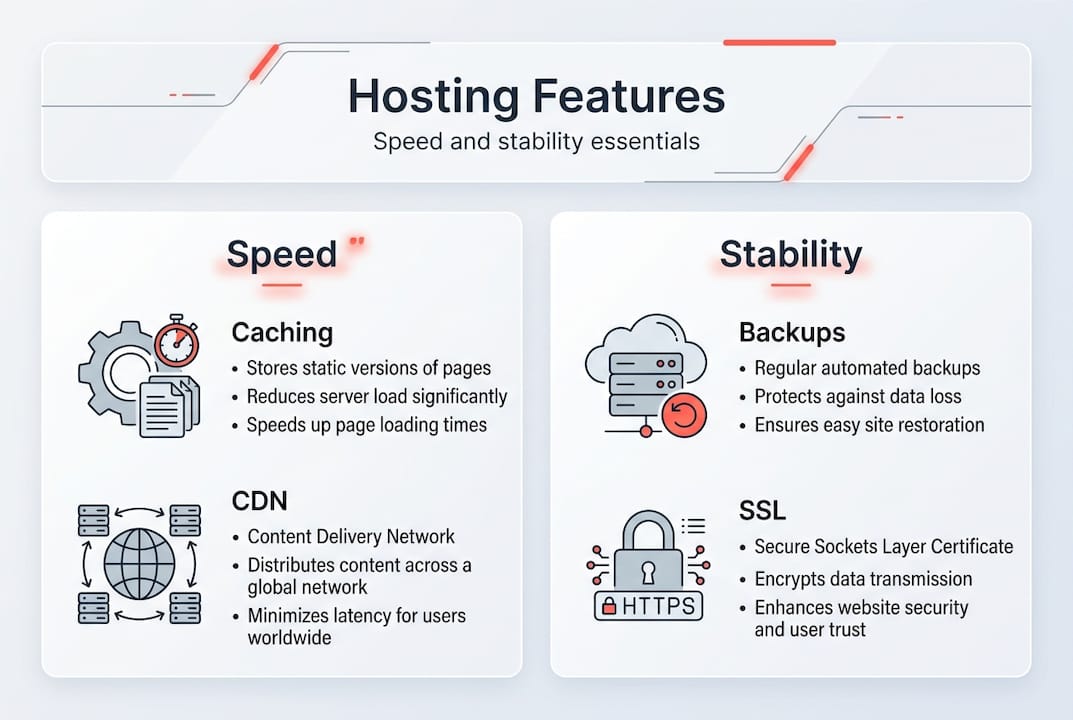
SSL certificates are often described simply as the padlock icon in a browser, but their role extends further. An SSL certificate encrypts all data passed between your server and your visitors, protecting form submissions, login credentials, and payment information. Reputable hosts now include free, auto-renewing SSL certificates as a standard feature. If a host charges extra for SSL or requires you to manage renewal manually, that’s a red flag worth taking seriously.

Backups are your insurance policy. Most business owners assume their hosting provider is backing up their site automatically, and sometimes they are, but the frequency and retention period vary wildly. A host that backs up weekly and stores one copy is dramatically different from one that backs up daily and keeps 30 days of history. Routine WordPress maintenance practices include verifying that backups are happening, testing restoration, and knowing exactly where those backups are stored.
Caching and CDN often get bundled together, but they solve different problems. Caching stores a static version of your page on the server so it doesn’t have to be rebuilt from scratch on every visit. A CDN (Content Delivery Network) stores copies of your static assets like images and scripts on servers distributed around the world, so a visitor in London gets data from a nearby node instead of waiting for your US-based server. Together, they’re the most impactful tools for how you speed up WordPress without changing a single line of code.
Staging environments are underused by small businesses but essential for agencies managing client sites. A staging site lets you install a plugin, test a theme change, or run a major WordPress update in a safe environment that mirrors your live site. You catch the problem before visitors do. Without staging, every update is a live experiment.
Comparing types of WordPress hosting: Managed, shared, and dedicated
Clear term definitions lead naturally into comparing your main hosting options. Because knowing what each type is called and what it actually delivers for your site are two very different things.
Here’s a direct comparison across the most important factors:
| Feature | Shared hosting | Managed WordPress | Dedicated hosting |
|---|---|---|---|
| Average TTFB | 500 to 900ms | ~367ms | Varies by configuration |
| Maintenance responsibility | You | Provider | You (unless managed) |
| SSL included | Sometimes | Usually yes | Rarely standard |
| Automatic backups | Rarely | Standard | Rarely standard |
| Scalability | Very limited | Good | Excellent |
| Ideal for | New/personal sites | SMBs and agencies | High-traffic enterprises |
| Cost | Lowest | Mid-range | Highest |
When you look at performance benchmarks comparing managed WordPress and shared environments, the TTFB gap alone is enough to shift your decision. But performance is only one dimension. Let’s look at three common scenarios:
-
A new small business launching its first website: Shared hosting can work here if traffic is minimal and the owner is comfortable with basic site management. The risk is that as the site grows, performance suffers and the migration to better hosting becomes disruptive and expensive.
-
A digital marketing agency managing 10 to 50 client sites: This is where managed WordPress hosting becomes essential. Agencies need consistent performance across all client sites, automated security updates, staging environments, and support they can count on. The value of WordPress hosting support for agencies goes beyond uptime. It directly affects client retention.
-
A high-traffic e-commerce store or media publication: Dedicated hosting with managed services makes sense here. The resource demands are too high for shared environments, and the cost of downtime is too steep to leave server management in anyone’s hands but the experts’.
Pro Tip: Managed WordPress hosting typically includes auto-renewing SSL certificates and daily automated backups as standard features. For business owners who aren’t managing their own servers, these aren’t nice-to-haves. They’re the baseline for keeping your site legally compliant, secure, and recoverable after any incident.
One hidden cost of cheap shared hosting that rarely appears in comparison articles is the cost of time. Every hour a business owner spends troubleshooting a slow site, managing a plugin conflict after a botched update, or panicking after a security breach is an hour not spent growing their business. Managed hosting absorbs that time cost.
Applying hosting knowledge: Making smart decisions
With the hosting types compared, here’s how you can apply this knowledge when evaluating real offers.
Most hosting providers structure their feature lists to look impressive on paper while burying the limitations in the fine print. Here’s a step-by-step evaluation framework:
-
Identify the hosting type first. Before comparing prices or storage sizes, confirm whether the plan is shared, managed, VPS, or dedicated. This tells you immediately who is responsible for what.
-
Look for TTFB benchmarks, not just “fast hosting” claims. Real performance data beats marketing language every time. If a host can’t show you benchmark data, that’s informative in itself.
-
Verify SSL details. Confirm that SSL is included, that it auto-renews, and that it covers your domain and any subdomains you need. As PCMag notes, SSL encrypts data transmission and reputable hosts provide it free with auto-renewal. Any host asking you to pay separately or renew manually should raise questions.
-
Understand the backup policy in detail. Ask: How often are backups taken? How many days of history are retained? How do you restore, and how long does it take? A host offering “backups” without answering these questions isn’t offering much protection.
-
Evaluate scalability language carefully. Terms like “unlimited bandwidth” almost always have a fair use policy buried in the terms of service. True scalability means your host can allocate additional resources on demand without migrating you to a new server.
-
Check support access and response times. Managed hosting promises fall apart if support is slow or inaccessible. Look for hosts that offer direct access to WordPress-specific technical support, not generic ticketing systems.
As you evaluate providers against these essential WordPress hosting features, remember that the combination of SSL, real backup infrastructure, and proven performance metrics forms the security baseline that every business site needs. The wrong choice of hosting doesn’t just affect your load times. It affects SEO, since Google’s Core Web Vitals directly measure page speed, and it affects customer trust, since a site that throws security warnings or goes down unexpectedly loses credibility fast.
Consider also that top WordPress plugins for performance like caching tools and CDN integrations work dramatically better on hosting infrastructure that’s already optimized for WordPress. The environment your site runs in shapes how effective every other tool can be.
What most hosting guides miss: The cost of misunderstanding terminology
Most hosting comparison guides focus on price tiers and storage quotas. What they rarely address is the cascading business damage that comes from misreading a feature list.
We’ve seen agencies sign clients onto shared hosting because it was labeled “business grade,” only to discover months later that that label meant nothing specific. The client’s site crawled under normal traffic, had no automated backups, and required manual SSL renewal. The agency’s reputation took the hit, not the host’s.
The deeper issue is that vague terminology creates a false sense of security. A host that lists “security features” without specifying firewalls, malware scanning, or intrusion detection is technically not lying. But a business owner reading that feature list reasonably believes their site is protected. When a breach happens, the fine print becomes very clear very fast.
Speed means nothing without the hosting features breakdown that keeps your site secure and recoverable. A site that loads in one second but loses customer data due to an unencrypted connection, or goes offline for three days because there was no valid backup, has failed its users completely. The terminology matters because it tells you what you’re actually getting, before you sign up and before something goes wrong.
Take your next step: Managed WordPress hosting made simple
Understanding hosting terminology is the first step. Choosing a host that actually delivers on its promises is the next one.
WP Tango was built specifically for businesses and agencies that want transparent, high-performance managed WordPress hosting without the jargon games. Every plan includes auto-renewing SSL, daily backups, and server hardware that’s intentionally undersold to prevent overcrowding. No shared resource surprises. No hidden limitations buried in the terms. If you’re ready to explore your options, compare WordPress hosting plans to find the right fit for your site size and traffic. And if you want to pair hosting with ongoing site care, check the maintenance plans and pricing to see how managed support makes the whole thing effortless.
Frequently asked questions
What is an SSL certificate in WordPress hosting?
An SSL certificate encrypts data between your website and visitors, and as PCMag confirms, reputable WordPress hosts provide it free with automatic renewal so you never face a lapsed certificate.
Why is TTFB important for my website?
TTFB measures how fast your server responds to a browser request, and managed hosting benchmarks show it averages 367ms on managed WordPress compared to 500 to 900ms on shared hosting, a difference visitors actually feel.
How do I know if a hosting plan is secure?
Look for automatic SSL with auto-renewal, daily backups with a clear retention policy, and a documented uptime guarantee. Vague security claims without these specific features offer very little real protection.
What is managed WordPress hosting?
Managed WordPress hosting means the provider handles all technical operations including security updates, backups, performance optimization, and support, so you can focus on running your business instead of managing a server.